


Một giáng sinh an lành đang đến, là Coder bạn có thể tự thiết kế cho mình Noel bằng Python để tăng bạn bè hoặc người thân. Nếu bạn không có thời gian, có thể dùng các Code sưu tầm dưới đây. Mỗi Code Python Noel có một thiết kế riêng nhưng đều mang đặc điểm chung là có cây thông Noel với tuyết rơi.
Code cây thông Noel bằng Python sẽ sử dụng thư viện Turtle để vẽ, do đó bạn cần import Turtle vào nhé.




Nếu bạn vẫn chưa biết sử dụng Python hãy đọc Seri bài viết về Python trên AnonyViet để có kiến thức nền nhé. Sau đó bạn dễ dàng thực thi các Code python Merry Christmas bên dưới:
Vẽ cây thông Noel với vòng lặp For
Với kiến thức Python cơ bản, bạn có thể vẽ cây thông Noel với vòng lặp For cực kỳ đơn giản. Đây là Full Code:
# Function to draw a Christmas tree with a given height
def draw_tree(height):
  # Loop through each row of the tree
  for i in range(1, height + 1):
    # Print the spaces before the asterisks on each row
    for j in range(height - i):
      print(" ", end="")
    # Print the asterisks on each row
    for j in range(2 * i - 1):
      print("*", end="")
    # Move to the next line
    print()
# Call the function to draw a tree with a height of 5
draw_tree(5)
Ở dòng cuối chỗ: draw_tree(5), thay số 5 thành số khác để thay đổi chiều cao của cây thông Noel bằng Python nhé.
Kết quả nè:
    *
   ***
  *****
 *******
*********
Code python cây thông Noel với bầu trời đầy sao
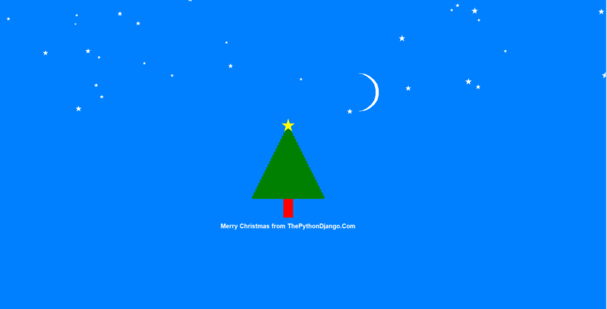
from turtle import *
from random import randint


def create_rectangle(turtle, color, x, y, width, height):
    turtle.penup()
    turtle.color(color)
    turtle.fillcolor(color)
    turtle.goto(x, y)
    turtle.pendown()
    turtle.begin_fill()

    turtle.forward(width)
    turtle.left(90)
    turtle.forward(height)
    turtle.left(90)
    turtle.forward(width)
    turtle.left(90)
    turtle.forward(height)
    turtle.left(90)

    # fill the above shape
    turtle.end_fill()
    # Reset the orientation of the turtle
    turtle.setheading(0)


def create_circle(turtle, x, y, radius, color):
    oogway.penup()
    oogway.color(color)
    oogway.fillcolor(color)
    oogway.goto(x, y)
    oogway.pendown()
    oogway.begin_fill()
    oogway.circle(radius)
    oogway.end_fill()


BG_COLOR = "#0080ff"

oogway = Turtle()
# set turtle speed
oogway.speed(2)
screen = oogway.getscreen()
# set background color
screen.bgcolor(BG_COLOR)
# set tile of screen
screen.title("Merry Christmas")
# maximize the screen
screen.setup(width=1.0, height=1.0)

y = -100
# create tree trunk
create_rectangle(oogway, "red", -15, y-60, 30, 60)

# create tree
width = 240
oogway.speed(10)
while width > 10:
    width = width - 10
    height = 10
    x = 0 - width/2
    create_rectangle(oogway, "green", x, y, width, height)
    y = y + height

# create a star a top of tree
oogway.speed(1)
oogway.penup()
oogway.color('yellow')
oogway.goto(-20, y+10)
oogway.begin_fill()
oogway.pendown()
for i in range(5):
    oogway.forward(40)
    oogway.right(144)
oogway.end_fill()

tree_height = y + 40

# create moon in sky
# create a full circle
create_circle(oogway, 230, 180, 60, "white")
# overlap with full circle of BG color to make a crescent shape
create_circle(oogway, 220, 180, 60, BG_COLOR)

# now add few stars in sky
oogway.speed(10)
number_of_stars = randint(20,30)
# print(number_of_stars)
for _ in range(0,number_of_stars):
    x_star = randint(-(screen.window_width()//2),screen.window_width()//2)
    y_star = randint(tree_height, screen.window_height()//2)
    size = randint(5,20)
    oogway.penup()
    oogway.color('white')
    oogway.goto(x_star, y_star)
    oogway.begin_fill()
    oogway.pendown()
    for i in range(5):
        oogway.forward(size)
        oogway.right(144)
    oogway.end_fill()

# print greeting message
oogway.speed(1)
oogway.penup()
msg = "Merry Christmas em iuuuuuuuu"
oogway.goto(0, -200)  # y is in minus because tree trunk was below x axis
oogway.color("white")
oogway.pendown()
oogway.write(msg, move=False, align="center", font=("Arial", 15, "bold"))

oogway.hideturtle()
screen.mainloop()
Thiệp Giáng sinh người tuyết bằng Python
Code này sẽ vẽ người tuyết và có tuyết rơi với dòng chữ tùy ý. Bạn có thể dùng công cụ soạn thảo Python để đổi lại tên của mình theo ý muốn. Hãy convert python ra exe và gửi cho crush chắc hẵn người ấy sẽ rất yêu bạn đấy.

import turtle
import random
import time

width = height = 500

window = turtle.Screen()
window.setup(width, height)
window.bgcolor("sky blue")
window.title("Happy Holidays")

snowball_rate = 1, 3
snowball_size = 5, 15
wind_change = 1, 5
max_wind = 3


# Create all circle-shaped objects
def make_circle(turtle_name, x, y, size, colour):
    turtle_name.color(colour)
    turtle_name.penup()
    turtle_name.setposition(x, y)
    turtle_name.dot(size)


# Create new snowballs and store in list
list_of_snowballs = []


def make_snowball():
    snowball = turtle.Turtle()
    snowball.color("white")
    snowball.penup()
    snowball.setposition(random.randint(-2 * width, width / 2), height / 2)
    snowball.hideturtle()
    snowball.size = random.randint(*snowball_size)
    list_of_snowballs.append(snowball)


def move_snowball(turtle_name, falling_speed=1, wind=0):
    turtle_name.clear()
    turtle_name.sety(turtle_name.ycor() - falling_speed)
    if wind:
        turtle_name.setx(turtle_name.xcor() + wind)
    turtle_name.dot(turtle_name.size)


# Snowman: body
snowman = turtle.Turtle()
x_position = 0
y_positions = 75, 0, -100
size = 75
for y in y_positions:
    make_circle(snowman, x_position, y, size, "white")
    size = size * 1.5

# Snowman: buttons
button_seperation = 25
button_y_positions = [y_positions[1] - button_seperation,
                      y_positions[1],
                      y_positions[1] + button_seperation]
for y in button_y_positions:
    make_circle(snowman, x_position, y, 10, "black")

# Snowman: eyes
y_offset = 10
x_seperation = 15
for x in x_position - x_seperation, x_position + x_seperation:
    make_circle(snowman, x, y_positions[0] + y_offset, 20, "green")
    make_circle(snowman, x, y_positions[0] + y_offset, 10, "black")

# Snowman: nose
snowman.color("orange")
snowman.setposition(x_position - 10, y_positions[0] - y_offset)
snowman.shape("triangle")
snowman.setheading(200)
snowman.turtlesize(0.5, 2.5)

window.tracer(0)

# Ground
grass = turtle.Turtle()
grass.fillcolor("forest green")
grass.penup()
grass.setposition(-width / 2, -height / 2)
grass.begin_fill()
for _ in range(2):
    grass.forward(width)
    grass.left(90)
    grass.forward(70)
    grass.left(90)
grass.end_fill()

ground = turtle.Turtle()
for x in range(int(-width / 2), int(width / 2), int(width / 200)):
    make_circle(ground, x, -180, random.randint(5, 20), "white")

text = turtle.Turtle()
text.color("red")
text.penup()
text.setposition(-100, 170)
#chữ thứ 1
text.write("Happy Holidays", font=("Apple Chancery", 30, "bold"), align="center")
text.setposition(130, 140)
text.color("dark green")
#chữ thứ 3
text.write("AnonyViet", font=("Avenir", 30, "bold"), align="right")
text.color("black")
#chữ thứ 4
text.write(".com", font=("Avenir", 30, "normal"), align="left")
text.setx(50)
#chữ thứ 2
text.write("from", font=("Apple Chancery", 20, "bold"), align="right")
text.hideturtle()

time_delay = 0
start_time = time.time()
wind = 0
wind_delay = 5
wind_timer = time.time()
wind_step = 0.1
while True:
    if time.time() - start_time > time_delay:
        make_snowball()
        start_time = time.time()
        time_delay = random.randint(*snowball_rate) / 10

    for snowball in list_of_snowballs:
        move_snowball(snowball, wind=wind)
        if snowball.ycor() < -height / 2:
            snowball.clear()
            list_of_snowballs.remove(snowball)

    if time.time() - wind_timer > wind_delay:
        wind += wind_step
        if wind >= max_wind:
            wind_step = -wind_step
        elif wind <= 0:
            wind_step = abs(wind_step)

        wind_timer = time.time()
        wind_delay = random.randint(*wind_change) / 10

    window.update()

turtle.done()
Code Python cây thông nodel có tuyết rơi
Code Python bên dươi sẽ vẽ một cây thông Noel với các đèn xunh quanh và hiệu ứng tuyết rơi. Bạn cũng có thể thay đổi các dòng chữ trong hình thành chữ mình thích để gửi cho bạn bè và người nhân dịp giáng sinh.
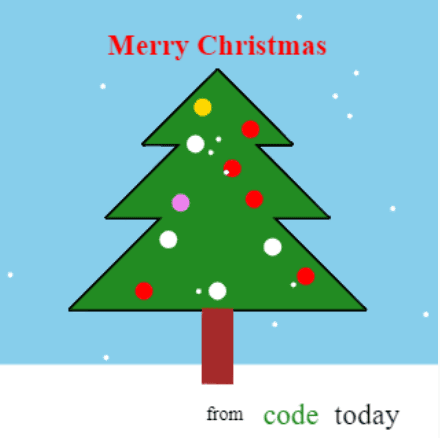
import turtle
import random

web_based = True
# web_based = False

if web_based:
    i_scale = 1.5
    snow_size = 4
    snow_speed = 3
    draw_speed = 10
    rate_of_snow_balls = 6
else:
    i_scale = 1
    snow_size = 7
    snow_speed = 2
    draw_speed = 10
    rate_of_snow_balls = 2

width = 600 / i_scale
height = 600 / i_scale

screen = turtle.Screen()
if not web_based:
    screen.setup(width, height)
    screen.title("Happy Christmas from AnonyViet")


# screen.tracer(0)


def make_triangle(x, y, size, outline, triangle):
    triangle.hideturtle()
    triangle.penup()
    triangle.setposition(x, y)
    triangle.pensize(3)
    if outline:
        triangle.pendown()
    if not outline:
        triangle.fillcolor("forest green")
        triangle.begin_fill()
    triangle.setposition(x + size, y - size)
    triangle.setposition(x - size, y - size)
    triangle.setposition(x, y)
    if not outline:
        triangle.end_fill()


def make_ball(x, y, size, colour, ball):
    ball.hideturtle()
    ball.penup()
    ball.setposition(x, y)
    ball.color(colour)
    ball.dot(size)


def move_snow(snow):
    position = snow.position()
    snow.clear()
    make_ball(position[0], position[1] - snow_speed, snow_size, "white", snow)


def snow_fall():
    rand_make_snow = random.randint(0, rate_of_snow_balls)
    if rand_make_snow == 0:
        snow = turtle.Turtle()
        snow.hideturtle()
        snow.penup()
        list_of_snow.append(snow)
        make_ball(random.randint(-width / 2, width / 2), width / 2, snow_size,
                  "white", snow)
    for snow in list_of_snow:
        move_snow(snow)
        if snow.position()[1] <= -width / 2:
            snow.clear()
            list_of_snow.remove(snow)
            del snow
    screen.update()


# make tree (main part)
triangle_1 = turtle.Turtle()
triangle_1.speed(draw_speed)
outline = True
for repeat in range(2):
    make_triangle(0, width / 3, width / 6, outline, triangle_1)
    make_triangle(0, width / 4, width / 4, outline, triangle_1)
    make_triangle(0, width / 8, width / 3, outline, triangle_1)
    outline = False

screen.tracer(0)
stem = turtle.Turtle()
# white snowy ground
stem.penup()
stem.hideturtle()
stem.setposition(-width, -width / 3)
stem.color("white")
stem.begin_fill()
stem.setposition(width, -width / 3)
stem.setposition(width, -width / 2)
stem.setposition(-width, -width / 2)
stem.end_fill()
screen.update()

# tree stem
stem.color("brown")
stem.setposition(-width / 30, -width / 4.8)
screen.tracer(1)
stem.pendown()
stem.begin_fill()
stem.setposition(width / 30, -width / 4.8)
stem.setposition(width / 30, -3 * width / 8)
stem.setposition(-width / 30, -3 * width / 8)
stem.setposition(-width / 30, -width / 4.8)
stem.end_fill()

screen.bgcolor("sky blue")

# decorations: balls
screen.tracer(2)
ball_colours = ["red", "red", "red", "gold", "violet", "white"]
ball_positions = [(-width / 30, width / 4), (3 * width / 40, width / 5),
                  (-width / 20, width / 6), (width / 30, width / 9),
                  (-width / 12, width / 30), (width / 12, width / 24),
                  (-width / 9, -width / 20), (width / 8, -width / 15),
                  (0, -width / 6), (-width / 6, -width / 6),
                  (width / 5, -width / 7.5)
                  ]
for position in ball_positions:
    make_ball(position[0], position[1], 20 / i_scale,
              random.choice(ball_colours),
              turtle.Turtle())
    screen.update()

# snow is falling…
list_of_snow = []

screen.tracer(0)
for _ in range(50):
    snow_fall()

text_1 = turtle.Turtle()
text_1.hideturtle()
text_1.penup()
text_1.setposition(0, width / 2.7)
text_1.color("red")
# text_1.write("Merry Christmas", font=("Georgia", 30, "bold"), align="center")
text_1.write("Merry Christmas",
             font=("Apple Chancery", max(int(30 / i_scale), 15), "bold"),
             align="center")

for _ in range(25):
    snow_fall()

text_1.setposition(width / 60, -width / 2.18)
text_1.color("black")
# text_1.write("from", font=("Georgia", 20, "normal"), align="center")
text_1.write("from",
             font=("Apple Chancery", max(int(20 / i_scale), 10), "normal"),
             align="center")
if web_based:
    text_1.setposition(width / 6, -width / 2.14)
else:
    text_1.setposition(width / 7.5, -width / 2.14)
text_1.color("forest green")
# text_1.write("code", font=("Arial", 30, "normal"), align="center")
text_1.write("code", font=("Avenir", max(int(30 / i_scale), 15), "normal"),
             align="center")
# text_1.setposition(150, -280)
if web_based:
    text_1.setposition(width / 2.95, -width / 2.14)
else:
    text_1.setposition(width / 3.85, -width / 2.14)
text_1.color("black")
# text_1.write("today", font=("Arial", 30, "normal"), align="center")
text_1.write("today", font=("Avenir", max(int(30 / i_scale), 15), "normal"),
             align="center")

if web_based:
    for _ in range(200):
        snow_fall()
else:
    while True:
        snow_fall()

turtle.done()
Câu hỏi thường gặp
Làm thế nào để thay đổi chiều cao của cây thông Noel trong ví dụ đầu tiên?
Chỉ cần thay đổi số trong hàm draw_tree(5). Ví dụ, draw_tree(10) sẽ tạo ra một cây thông cao hơn.
Tôi cần cài đặt thư viện nào để chạy code vẽ cây thông Noel với bầu trời đầy sao?
Code này sử dụng thư viện turtle và random. Bạn có thể cài đặt chúng bằng cách sử dụng pip: pip install PythonTurtle (nếu chưa có thư viện turtle)
Code người tuyết có thể tùy chỉnh tên không?
Có, bạn có thể thay đổi dòng chữ “Happy Holidays” trong code người tuyết thành bất kỳ tên hoặc thông điệp nào bạn muốn bằng cách chỉnh sửa phần code text.write(...).











anh có thể giúp em giải mã hóa python được không em đã dùng tool python không xác định và kiến máy em bị hết pin nhanh và lag mong anh giúp em cảm ơn anh.