


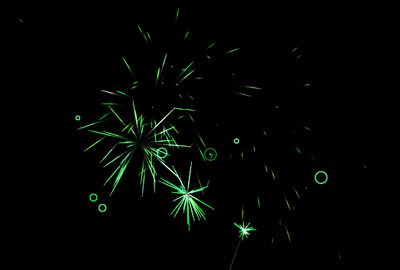
Hôm nay mình sẽ đem đến cho các bạn thêm một ít kiến thức về sử dụng HTML5 và Javascript . Hôm nay mình sẽ hướng dẫn cho các bạn cách làm hiệu ứng bắn pháo hoa rất đẹp mắt để trang trí Website cho bạn vào ngày tết, đặc biệt khi click chuột sẽ có hiệu ứng đi kèm. Qua bài viết này, hi vọng các bạn sẽ nắm thêm 1 phần kiến thức về HTML5 Canvas.
Bạn có thể xem trước bản Demo tại đây


Các bạn tạo ra 3 file: index.html, style.css, script.js theo nội dung bên dưới, lưu vào cùng thư mục. Hoặc đơn giản tải file này xuống đã có sẵn code.
Bước 1: Tạo 1 file index.html với nội dung
<!DOCTYPE html>
<html>
<head>
<meta charset="utf-8" />
<title>Tạo hiệu ứng bắn pháo hoa bằng HTML5 và Javascript</title>
<link rel="icon" href="https://anonyviet.com/resource/phaohoa2/favicon.ico" type="image/x-ico"/>

<link href="style.css" rel="stylesheet" />

</head>
<body>

<div id="info">
	<p style="color:#e1e1b8;" ><b>Tạo hiệu ứng bắn pháo hoa bằng HTML5 và Javascript</b></p>
	<p>Hãy thử tìm hiểu và áp dụng ngay cho website của mình để cùng chào đón tết nguyên đán nha các bạn. <a href="https://anonyviet.com/code-tao-phao-hoa-dung-html-5-va-javascript/">Xem Cách Làm</a>.</p>
</div>

<canvas id="canvas">Canvas không hổ trợ trình duyệt của bạn.</canvas>
<script type="text/javascript" src="script.js"> </script>
</body>
</html>
Bước 2: Tạo 1 file CSS đặt tên là style.css với nội dung:
#info {
	background:#333;
	opacity:0.8;
	position: absolute;
	top:5px;
	right:5px;
	width:280px;
	color:#fff;
	border-radius: 5px;
	z-index:10

}

#info p {
   padding:0 10px;
}

#info a{ color:#f2ea0a; }

/* basic styles for black background and crosshair cursor */
body {
	background: #000;
	margin: 0;
}

canvas {
	cursor: crosshair;
	display: block;
}
Bước 3: Tạo file script.js với nội dung (Đây là file quan trọng tạo ra pháo hoa)
// when animating on canvas, it is best to use requestAnimationFrame instead of setTimeout or setInterval
// not supported in all browsers though and sometimes needs a prefix, so we need a shim
window.requestAnimFrame = ( function() {
	return window.requestAnimationFrame ||
				window.webkitRequestAnimationFrame ||
				window.mozRequestAnimationFrame ||
				function( callback ) {
					window.setTimeout( callback, 1000 / 60 );
				};
})();

// now we will setup our basic variables for the demo
var canvas = document.getElementById( 'canvas' ),
		ctx = canvas.getContext( '2d' ),
		// full screen dimensions
		cw = window.innerWidth,
		ch = window.innerHeight,
		// firework collection
		fireworks = [],
		// particle collection
		particles = [],
		// starting hue
		hue = 120,
		// when launching fireworks with a click, too many get launched at once without a limiter, one launch per 5 loop ticks
		limiterTotal = 5,
		limiterTick = 0,
		// this will time the auto launches of fireworks, one launch per 80 loop ticks
		timerTotal = 80,
		timerTick = 0,
		mousedown = false,
		// mouse x coordinate,
		mx,
		// mouse y coordinate
		my;

// set canvas dimensions
canvas.width = cw;
canvas.height = ch;

// now we are going to setup our function placeholders for the entire demo

// get a random number within a range
function random( min, max ) {
	return Math.random() * ( max - min ) + min;
}

// calculate the distance between two points
function calculateDistance( p1x, p1y, p2x, p2y ) {
	var xDistance = p1x - p2x,
			yDistance = p1y - p2y;
	return Math.sqrt( Math.pow( xDistance, 2 ) + Math.pow( yDistance, 2 ) );
}

// create firework
function Firework( sx, sy, tx, ty ) {
	// actual coordinates
	this.x = sx;
	this.y = sy;
	// starting coordinates
	this.sx = sx;
	this.sy = sy;
	// target coordinates
	this.tx = tx;
	this.ty = ty;
	// distance from starting point to target
	this.distanceToTarget = calculateDistance( sx, sy, tx, ty );
	this.distanceTraveled = 0;
	// track the past coordinates of each firework to create a trail effect, increase the coordinate count to create more prominent trails
	this.coordinates = [];
	this.coordinateCount = 3;
	// populate initial coordinate collection with the current coordinates
	while( this.coordinateCount-- ) {
		this.coordinates.push( [ this.x, this.y ] );
	}
	this.angle = Math.atan2( ty - sy, tx - sx );
	this.speed = 2;
	this.acceleration = 1.05;
	this.brightness = random( 50, 70 );
	// circle target indicator radius
	this.targetRadius = 1;
}

// update firework
Firework.prototype.update = function( index ) {
	// remove last item in coordinates array
	this.coordinates.pop();
	// add current coordinates to the start of the array
	this.coordinates.unshift( [ this.x, this.y ] );

	// cycle the circle target indicator radius
	if( this.targetRadius < 8 ) {
		this.targetRadius += 0.3;
	} else {
		this.targetRadius = 1;
	}

	// speed up the firework
	this.speed *= this.acceleration;

	// get the current velocities based on angle and speed
	var vx = Math.cos( this.angle ) * this.speed,
			vy = Math.sin( this.angle ) * this.speed;
	// how far will the firework have traveled with velocities applied?
	this.distanceTraveled = calculateDistance( this.sx, this.sy, this.x + vx, this.y + vy );

	// if the distance traveled, including velocities, is greater than the initial distance to the target, then the target has been reached
	if( this.distanceTraveled >= this.distanceToTarget ) {
		createParticles( this.tx, this.ty );
		// remove the firework, use the index passed into the update function to determine which to remove
		fireworks.splice( index, 1 );
	} else {
		// target not reached, keep traveling
		this.x += vx;
		this.y += vy;
	}
}

// draw firework
Firework.prototype.draw = function() {
	ctx.beginPath();
	// move to the last tracked coordinate in the set, then draw a line to the current x and y
	ctx.moveTo( this.coordinates[ this.coordinates.length - 1][ 0 ], this.coordinates[ this.coordinates.length - 1][ 1 ] );
	ctx.lineTo( this.x, this.y );
	ctx.strokeStyle = 'hsl(' + hue + ', 100%, ' + this.brightness + '%)';
	ctx.stroke();

	ctx.beginPath();
	// draw the target for this firework with a pulsing circle
	ctx.arc( this.tx, this.ty, this.targetRadius, 0, Math.PI * 2 );
	ctx.stroke();
}

// create particle
function Particle( x, y ) {
	this.x = x;
	this.y = y;
	// track the past coordinates of each particle to create a trail effect, increase the coordinate count to create more prominent trails
	this.coordinates = [];
	this.coordinateCount = 5;
	while( this.coordinateCount-- ) {
		this.coordinates.push( [ this.x, this.y ] );
	}
	// set a random angle in all possible directions, in radians
	this.angle = random( 0, Math.PI * 2 );
	this.speed = random( 1, 10 );
	// friction will slow the particle down
	this.friction = 0.95;
	// gravity will be applied and pull the particle down
	this.gravity = 1;
	// set the hue to a random number +-20 of the overall hue variable
	this.hue = random( hue - 20, hue + 20 );
	this.brightness = random( 50, 80 );
	this.alpha = 1;
	// set how fast the particle fades out
	this.decay = random( 0.015, 0.03 );
}

// update particle
Particle.prototype.update = function( index ) {
	// remove last item in coordinates array
	this.coordinates.pop();
	// add current coordinates to the start of the array
	this.coordinates.unshift( [ this.x, this.y ] );
	// slow down the particle
	this.speed *= this.friction;
	// apply velocity
	this.x += Math.cos( this.angle ) * this.speed;
	this.y += Math.sin( this.angle ) * this.speed + this.gravity;
	// fade out the particle
	this.alpha -= this.decay;

	// remove the particle once the alpha is low enough, based on the passed in index
	if( this.alpha <= this.decay ) {
		particles.splice( index, 1 );
	}
}

// draw particle
Particle.prototype.draw = function() {
	ctx. beginPath();
	// move to the last tracked coordinates in the set, then draw a line to the current x and y
	ctx.moveTo( this.coordinates[ this.coordinates.length - 1 ][ 0 ], this.coordinates[ this.coordinates.length - 1 ][ 1 ] );
	ctx.lineTo( this.x, this.y );
	ctx.strokeStyle = 'hsla(' + this.hue + ', 100%, ' + this.brightness + '%, ' + this.alpha + ')';
	ctx.stroke();
}

// create particle group/explosion
function createParticles( x, y ) {
	// increase the particle count for a bigger explosion, beware of the canvas performance hit with the increased particles though
	var particleCount = 30;
	while( particleCount-- ) {
		particles.push( new Particle( x, y ) );
	}
}

// main demo loop
function loop() {
	// this function will run endlessly with requestAnimationFrame
	requestAnimFrame( loop );

	// increase the hue to get different colored fireworks over time
	hue += 0.5;

	// normally, clearRect() would be used to clear the canvas
	// we want to create a trailing effect though
	// setting the composite operation to destination-out will allow us to clear the canvas at a specific opacity, rather than wiping it entirely
	ctx.globalCompositeOperation = 'destination-out';
	// decrease the alpha property to create more prominent trails
	ctx.fillStyle = 'rgba(0, 0, 0, 0.5)';
	ctx.fillRect( 0, 0, cw, ch );
	// change the composite operation back to our main mode
	// lighter creates bright highlight points as the fireworks and particles overlap each other
	ctx.globalCompositeOperation = 'lighter';

	// loop over each firework, draw it, update it
	var i = fireworks.length;
	while( i-- ) {
		fireworks[ i ].draw();
		fireworks[ i ].update( i );
	}

	// loop over each particle, draw it, update it
	var i = particles.length;
	while( i-- ) {
		particles[ i ].draw();
		particles[ i ].update( i );
	}

	// launch fireworks automatically to random coordinates, when the mouse isn't down
	if( timerTick >= timerTotal ) {
		if( !mousedown ) {
			// start the firework at the bottom middle of the screen, then set the random target coordinates, the random y coordinates will be set within the range of the top half of the screen
			fireworks.push( new Firework( cw / 2, ch, random( 0, cw ), random( 0, ch / 2 ) ) );
			timerTick = 0;
		}
	} else {
		timerTick++;
	}

	// limit the rate at which fireworks get launched when mouse is down
	if( limiterTick >= limiterTotal ) {
		if( mousedown ) {
			// start the firework at the bottom middle of the screen, then set the current mouse coordinates as the target
			fireworks.push( new Firework( cw / 2, ch, mx, my ) );
			limiterTick = 0;
		}
	} else {
		limiterTick++;
	}
}

// mouse event bindings
// update the mouse coordinates on mousemove
canvas.addEventListener( 'mousemove', function( e ) {
	mx = e.pageX - canvas.offsetLeft;
	my = e.pageY - canvas.offsetTop;
});

// toggle mousedown state and prevent canvas from being selected
canvas.addEventListener( 'mousedown', function( e ) {
	e.preventDefault();
	mousedown = true;
});

canvas.addEventListener( 'mouseup', function( e ) {
	e.preventDefault();
	mousedown = false;
});

// once the window loads, we are ready for some fireworks!
window.onload = loop;
Các đoạn script trên, đều có chú thích từng bước cụ thể ở từng phần, nếu bạn muốn chỉnh sửa thêm bơt code có thể đọc chú thích để tham khảo. Điều quan trọng là đoạn script này các bạn phải đặt bên dưới thẻ <body> nhé








làm sao mới có được ad. em up lên host rồi mà sao có thấy gì đâu :((
em giải nén file download về có 3 file, up 3 file đó lên cùng 1 thư mục trên website là dc
ủa. em làm y chan anh nói lun đó. nhưng ssao không được ta.
của e báo lỗi ntn? chụp màn hình a xem
Hay lắm ad
Chắc đến năm 2018 mới dùng rồi :(((
Hẹn gặp lại code này bài này lần nữa..Thanks Ad nhiều nha
thank ad nhieeuflawm năm sau chắc sẽ dùng
share code bá đạo thật
cái này chắc cũng có dùng trong game tạo hiệu ứng đạn bay
sao em làm ko đc
cái này làm sao để đưa vô blog đc ạ <3
đẻ đưa vào blogger thì xóa coppy cái css sang thẻ html tảo thẻ style trong thẻ head rồi dán vào là đc
thanks ad, thanks ad và thanks ad
Cám ơn Admin em làm được rồi ^^
(Cmt trước em hỏi mà em đã làm được rồi ạ, anh khỏi duyệt cmt đó nhé.)
Admin ơi, giúp em sửa lại phần pháo hoa và nội dung web bị tách biệt ra thành 2 thành phần với ạ ( phiền anh vào web e xem nếu diễn tả ad chưa hiểu @@ ). Em muốn cho nó bắn pháo hoa lên phần nội dung của web luôn chứ không bị tách biệt ra ạ