


AnonyViet từng share một bộ source code ma trận bằng Canvas rất đẹp và được phản hồi rất tốt. Hôm nay, mình sẽ chia sẽ thêm bộ Source code ma trận 3D được viết bằng HTML – CSS và JS. Hiệu ứng đổ chữ theo chiều dọc trên nền đen giống trong các bộ phim hacker.
Hiệu ứng này tạo nên một phong cách rất lạnh lùng giống các Hacker trong phim. Bạn có thể sử dụng bộ source code này để học thêm kiến thức hoặc khoe bạn bè cho vui. Với hiệu ứng có ma trận chiều sâu, làm cho màn hình trở nên thật huyền bí. Bây giờ, mình sẽ giới thiệu bộ Source code và cách sử dụng cho bạn xem.
Giới thiệu về bộ source code hiệu ứng ma trận 3D
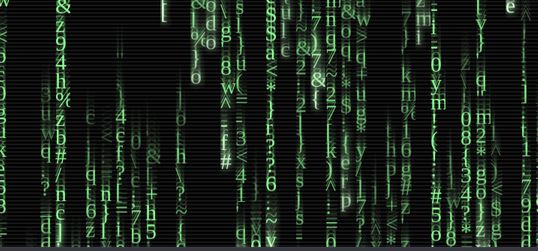
do các dòng chữ đang rơi nên khi mình chụp nó hơi bị lem lem, nhưng thực tế thì hiệu ứng này rất đẹp.
Hướng dẫn sử dụng
Tạo một file index.html có nội dung code như sau:
<!DOCTYPE html>
<html lang="en" >
   <head>
      <meta charset="UTF-8">
      <title>Matrix code rain</title>
      <link rel="stylesheet" href="css/style.css">
   </head>
   <body>
      <html>
         <body>
            <div id="info">
               <p><strong>Matrix code rain</strong></p>
               <p>Experiment write up <a href="http://neilcarpenter.com/labs/matrix-rain" target="_blank">here</a>.</p>

               <a href="#" class="toggle-info" id="open">Show info</a>
               <a href="#" class="toggle-info" id="close">Hide info</a>
            </div>
            <canvas id="canvas"></canvas>
         </body>
         <a href="https://github.com/neilcarpenter/Matrix-code-rain" id="ribbon" target="_blank"><img style="position: absolute; top: 0; right: 0; border: 0; z-index: 50;" src="https://s3.amazonaws.com/github/ribbons/forkme_right_red_aa0000.png" alt="Fork me on GitHub"></a>
      </html>
      <script src='https://neilcarpenter.com/demos/canvas/matrix/stats.min.js'></script>
      <script  src="js/index.js"></script>
   </body>
</html>
Tiếp theo tạo một thư mục tên JS và trong thư mục đó tạo thêm một file index.js có nội dung như sau:
(function() {
    var lastTime = 0;
    var vendors = ['ms', 'moz', 'webkit', 'o'];
    for(var x = 0; x < vendors.length && !window.requestAnimationFrame; ++x) {
        window.requestAnimationFrame = window[vendors[x]+'RequestAnimationFrame'];
        window.cancelAnimationFrame = window[vendors[x]+'CancelAnimationFrame']
                                   || window[vendors[x]+'CancelRequestAnimationFrame'];
    }

    if (!window.requestAnimationFrame)
        window.requestAnimationFrame = function(callback, element) {
            var currTime = new Date().getTime();
            var timeToCall = Math.max(0, 16 - (currTime - lastTime));
            var id = window.setTimeout(function() { callback(currTime + timeToCall); },
              timeToCall);
            lastTime = currTime + timeToCall;
            return id;
        };

    if (!window.cancelAnimationFrame)
        window.cancelAnimationFrame = function(id) {
            clearTimeout(id);
        };
}());

// stats
var stats = new Stats();
stats.setMode(0);
stats.domElement.style.position = 'absolute';
stats.domElement.style.left = '0px';
stats.domElement.style.top = '0px';
document.body.appendChild( stats.domElement );


var M = {

  settings: {
		COL_WIDTH: 20,
		COL_HEIGHT: 25,
		VELOCITY_PARAMS: {
			min: 4,
			max: 8
		},
		CODE_LENGTH_PARAMS: {
			min: 20,
			max: 40
		}
	},

	animation: null,

	c: null,
	ctx: null,

	lineC: null,
	ctx2: null,

	WIDTH: window.innerWidth,
	HEIGHT: window.innerHeight,

	COLUMNS: null,
	canvii: [],

	// font from here https://www.dafont.com/matrix-code-nfi.font
	font: '30px matrix-code',
	letters: ['a', 'b', 'c', 'd', 'e', 'f', 'g', 'h', 'i', 'j', 'k', 'l', 'm', 'n', 'o', 'p', 'q', 'r', 's', 't', 'u', 'v', 'w', 'x', 'y', 'z', '0', '1', '2', '3', '4', '5', '6', '7', '8', '9', '$', '+', '-', '*', '/', '=', '%', '"', '\'', '#', '&', '_', '(', ')', ',', '.', ';', ':', '?', '!', '\\', '|', '{', '}', '<', '>', '[', ']', '^', '~'],

	codes: [],

	createCodeLoop: null,
	codesCounter: 0,

	init: function () {
		M.c = document.getElementById( 'canvas' );
		M.ctx = M.c.getContext( '2d' );
		M.c.width = M.WIDTH;
		M.c.height = M.HEIGHT;

		M.ctx.shadowBlur = 0;
		M.ctx.fillStyle = '#000';
		M.ctx.fillRect(0, 0, M.WIDTH, M.HEIGHT);
		M.ctx.font = M.font;

		M.COLUMNS = Math.ceil(M.WIDTH / M.settings.COL_WIDTH);

		for (var i = 0; i < M.COLUMNS; i++) {
			M.codes[i] = [];
			M.codes[i][0] = {
				'open': true,
				'position': {'x': 0, 'y': 0},
				'strength': 0
			};
		}

		M.loop();

		M.createLines();

		M.createCode();

		// not doing this, kills CPU
		// M.swapCharacters();

		window.onresize = function () {
			window.cancelAnimationFrame(M.animation);
			M.animation = null;
			M.ctx.clearRect(0, 0, M.WIDTH, M.HEIGHT);
			M.codesCounter = 0;

			M.ctx2.clearRect(0, 0, M.WIDTH, M.HEIGHT);

			M.WIDTH = window.innerWidth;
			M.HEIGHT = window.innerHeight;
			M.init();
		};
	},

	loop: function () {
		M.animation = requestAnimationFrame( function(){ M.loop(); } );
		M.draw();

		stats.update();
	},

	// this used to be used straight after createCode, without using createCanvii - it allowed
	// the characters within the code streams to be easily changable, but caused huge perf issues
	// OLDdraw: function() {

	// 	var codesLen = M.codes.length;
	// 	var codeLen;
	// 	var x;
	// 	var y;
	// 	var text;
	// 	var velocity;
	// 	var columnIndex;
	// 	var strength;
	// 	var fadeStrength;

	// 	M.ctx.shadowColor = 'rgba(0, 0, 0, 0.5)';
	// 	M.ctx.fillStyle = 'rgba(0, 0, 0, 0.5)';
	// 	M.ctx.fillRect(0, 0, M.WIDTH, M.HEIGHT);

	// 	M.ctx.globalCompositeOperation = 'source-over';

	// 	for (var i = 0; i < codesLen; i++) {

	// 		velocity = M.codes[i][0].velocity;
	// 		M.codes[i][0].position.y += velocity;

	// 		y = M.codes[i][0].position.y;
	// 		x = M.codes[i][0].position.x;
	// 		codeLength = M.codes[i].length;
	// 		strength = M.codes[i][0].strength;

	// 		for (var j = 1; j < codeLength; j++) {
	// 			text = M.codes[i][j];

	// 			if (j < 5) {
	// 				M.ctx.shadowColor = 'hsl(104, 79%, 74%)';
	// 				M.ctx.shadowOffsetX = 0;
	// 				M.ctx.shadowOffsetY = 0;
	// 				M.ctx.shadowBlur = 10;
	// 				M.ctx.fillStyle = 'hsla(104, 79%, ' + (100 - (j * 5)) + '%, ' + strength + ')';
	// 			} else if (j > (codeLength - 4)) {
	// 				fadeStrength = j / codeLength;
	// 				fadeStrength = 1 - fadeStrength;

	// 				M.ctx.shadowOffsetX = 0;
	// 				M.ctx.shadowOffsetY = 0;
	// 				M.ctx.shadowBlur = 0;
	// 				M.ctx.fillStyle = 'hsla(104, 79%, 74%, ' + (fadeStrength + 0.3) + ')';
	// 			} else {
	// 				M.ctx.shadowOffsetX = 0;
	// 				M.ctx.shadowOffsetY = 0;
	// 				M.ctx.shadowBlur = 0;
	// 				M.ctx.fillStyle = 'hsla(104, 79%, 74%, ' + strength + ')';
	// 			}

	// 			// M.ctx.fillStyle = 'hsl(104, 79%, ' + (M.codes[i][0].strength * 74) + '%)';
	// 			M.ctx.fillText(text, x, (y - (j * M.settings.COL_HEIGHT)));

	// 			if ((j === codeLength - 1) && (y - ((j + 1) * M.settings.COL_HEIGHT) > M.HEIGHT)) {
	// 				columnIndex = M.codes[i][0].position.x / M.settings.COL_WIDTH;
	// 				M.codes[columnIndex][0].open = true;
	// 				M.codes[columnIndex][0].position.y = 0;
	// 			}
	// 		}
	// 	}

	// },

	draw: function() {

		var velocity, height, x, y, c, ctx;

		// slow fade BG colour
		M.ctx.shadowColor = 'rgba(0, 0, 0, 0.5)';
		M.ctx.fillStyle = 'rgba(0, 0, 0, 0.5)';
		M.ctx.fillRect(0, 0, M.WIDTH, M.HEIGHT);

		M.ctx.globalCompositeOperation = 'source-over';

		for (var i = 0; i < M.COLUMNS; i++) {

			// check member of array isn't undefined at this point
			if (M.codes[i][0].canvas) {
				velocity = M.codes[i][0].velocity;
				height = M.codes[i][0].canvas.height;
				x = M.codes[i][0].position.x;
				y = M.codes[i][0].position.y - height;
				c = M.codes[i][0].canvas;
				ctx = c.getContext('2d');

				M.ctx.drawImage(c, x, y, M.settings.COL_WIDTH, height);

				if ((M.codes[i][0].position.y - height) < M.HEIGHT){
					M.codes[i][0].position.y += velocity;
				} else {
					M.codes[i][0].position.y = 0;
				}

			}
		}

	},

	createCode: function() {

		if (M.codesCounter > M.COLUMNS) {
			clearTimeout(M.createCodeLoop);
			return;
		}

		var randomInterval = M.randomFromInterval(0, 100);
		var column = M.assignColumn();

		if (column) {

			var codeLength = M.randomFromInterval(M.settings.CODE_LENGTH_PARAMS.min, M.settings.CODE_LENGTH_PARAMS.max);
			var codeVelocity = (Math.random() * (M.settings.VELOCITY_PARAMS.max - M.settings.VELOCITY_PARAMS.min)) + M.settings.VELOCITY_PARAMS.min;
			var lettersLength = M.letters.length;

			M.codes[column][0].position = {'x': (column * M.settings.COL_WIDTH), 'y': 0};
			M.codes[column][0].velocity = codeVelocity;
			M.codes[column][0].strength = M.codes[column][0].velocity / M.settings.VELOCITY_PARAMS.max;

			for (var i = 1; i <= codeLength; i++) {
				var newLetter = M.randomFromInterval(0, (lettersLength - 1));
				M.codes[column][i] = M.letters[newLetter];
			}

			M.createCanvii(column);

			M.codesCounter++;

		}

		M.createCodeLoop = setTimeout(M.createCode, randomInterval);

	},

	createCanvii: function(i) {

		var codeLen = M.codes[i].length - 1;
		var canvHeight = codeLen * M.settings.COL_HEIGHT;
		var velocity = M.codes[i][0].velocity;
		var strength = M.codes[i][0].strength;
		var text, fadeStrength;

		var newCanv = document.createElement('canvas');
		var newCtx = newCanv.getContext('2d');

		newCanv.width = M.settings.COL_WIDTH;
		newCanv.height = canvHeight;

		for (var j = 1; j < codeLen; j++) {
			text = M.codes[i][j];
			newCtx.globalCompositeOperation = 'source-over';
			newCtx.font = '30px matrix-code';

			if (j < 5) {
				newCtx.shadowColor = 'hsl(104, 79%, 74%)';
				newCtx.shadowOffsetX = 0;
				newCtx.shadowOffsetY = 0;
				newCtx.shadowBlur = 10;
				newCtx.fillStyle = 'hsla(104, 79%, ' + (100 - (j * 5)) + '%, ' + strength + ')';
			} else if (j > (codeLen - 4)) {
				fadeStrength = j / codeLen;
				fadeStrength = 1 - fadeStrength;

				newCtx.shadowOffsetX = 0;
				newCtx.shadowOffsetY = 0;
				newCtx.shadowBlur = 0;
				newCtx.fillStyle = 'hsla(104, 79%, 74%, ' + (fadeStrength + 0.3) + ')';
			} else {
				newCtx.shadowOffsetX = 0;
				newCtx.shadowOffsetY = 0;
				newCtx.shadowBlur = 0;
				newCtx.fillStyle = 'hsla(104, 79%, 74%, ' + strength + ')';
			}

			newCtx.fillText(text, 0, (canvHeight - (j * M.settings.COL_HEIGHT)));
		}

		M.codes[i][0].canvas = newCanv;

	},

	swapCharacters: function() {
		var randomCodeIndex;
		var randomCode;
		var randomCodeLen;
		var randomCharIndex;
		var newRandomCharIndex;
		var newRandomChar;

		for (var i = 0; i < 20; i++) {
			randomCodeIndex = M.randomFromInterval(0, (M.codes.length - 1));
			randomCode = M.codes[randomCodeIndex];
			randomCodeLen = randomCode.length;
			randomCharIndex = M.randomFromInterval(2, (randomCodeLen - 1));
			newRandomCharIndex = M.randomFromInterval(0, (M.letters.length - 1));
			newRandomChar = M.letters[newRandomCharIndex];

			randomCode[randomCharIndex] = newRandomChar;
		}

		M.swapCharacters();
	},

	createLines: function() {
		M.linesC = document.createElement('canvas');
		M.linesC.width = M.WIDTH;
		M.linesC.height = M.HEIGHT;
		M.linesC.style.position = 'absolute';
		M.linesC.style.top = 0;
		M.linesC.style.left = 0;
		M.linesC.style.zIndex = 10;
		document.body.appendChild(M.linesC);

		var linesYBlack = 0;
		var linesYWhite = 0;
		M.ctx2 = M.linesC.getContext('2d');

		M.ctx2.beginPath();

		M.ctx2.lineWidth = 1;
		M.ctx2.strokeStyle = 'rgba(0, 0, 0, 0.7)';

		while (linesYBlack < M.HEIGHT) {

			M.ctx2.moveTo(0, linesYBlack);
			M.ctx2.lineTo(M.WIDTH, linesYBlack);

			linesYBlack += 5;
		}

		M.ctx2.lineWidth = 0.15;
		M.ctx2.strokeStyle = 'rgba(255, 255, 255, 0.7)';

		while (linesYWhite < M.HEIGHT) {

			M.ctx2.moveTo(0, linesYWhite+1);
			M.ctx2.lineTo(M.WIDTH, linesYWhite+1);

			linesYWhite += 5;
		}

		M.ctx2.stroke();
	},

	assignColumn: function() {
		var randomColumn = M.randomFromInterval(0, (M.COLUMNS - 1));

		if (M.codes[randomColumn][0].open) {
			M.codes[randomColumn][0].open = false;
		} else {
			return false;
		}

		return randomColumn;
	},

	randomFromInterval: function(from, to) {
		return Math.floor(Math.random() * (to - from+ 1 ) + from);
	},

	snapshot: function() {
		window.open(M.c.toDataURL());
	}

};

function eventListenerz() {
	var controlToggles = document.getElementsByClassName('toggle-info');
	var controls = document.getElementById('info');
	var snapshotBtn = document.getElementById('snapshot');

	function toggleControls(e) {
		e.preventDefault();
		controls.className = controls.className === 'closed' ? '' : 'closed';
	}

	for (var j = 0; j < 2; j++) {
		controlToggles[j].addEventListener('click', toggleControls, false);
	}

	snapshotBtn.addEventListener('click', M.snapshot, false);

}

window.onload = function() {

	M.init();

	eventListenerz();

};
Cuối cùng tạo thư mục tên css chứa file style.css có nội dung như sau:
@import url("https://fonts.googleapis.com/css?family=Carrois+Gothic");

@font-face {
  font-family: 'matrix-code';
  src: url('https://neilcarpenter.com/demos/canvas/matrix/font/matrix-code.eot?#iefix') format('embedded-opentype'),
       url('https://neilcarpenter.com/demos/canvas/matrix/font/matrix-code.woff') format('woff'),
       url('https://neilcarpenter.com/demos/canvas/matrix/font/matrix-code.ttf')  format('truetype'),
       url('https://neilcarpenter.com/demos/canvas/matrix/font/matrix-code.svg#svgFontName') format('svg');
}

html, body {
    -webkit-font-smoothing: antialiased;
    font: normal 12px/14px "Carrois Gothic", sans-serif;
    width: 100%;
    height: 100%;
    margin: 0;
    overflow: hidden;
    color: #fff;

    -webkit-user-select: none;
       -moz-user-select: none;
        -ms-user-select: none;
            user-select: none;
}

body {
  background: black;
}

#stats {
    z-index: 100;
}

#info {
    background: rgba(0, 0, 0, 0.7);
    position: fixed;
    bottom: 0;
    left: 0px;
    width: 250px;
    padding: 10px 20px 20px;
    z-index: 100;
    -webkit-transform-origin: bottom center;
       -moz-transform-origin: bottom center;
         -o-transform-origin: bottom center;
            transform-origin: bottom center;
    -webkit-transform: rotate(0deg);
       -moz-transform: rotate(0deg);
         -o-transform: rotate(0deg);
            transform: rotate(0deg);
    -webkit-transition: -webkit-transform .5s ease-in-out;
       -moz-transition:    -moz-transform .5s ease-in-out;
         -o-transition:      -o-transform .5s ease-in-out;
            transition:         transform .5s ease-in-out;
}

#info.closed {
    -webkit-transform: rotate(180deg);
       -moz-transform: rotate(180deg);
         -o-transform: rotate(180deg);
            transform: rotate(180deg);
}

.toggle-info {
    position: absolute;
    display: block;
    height: 10px;
    background: rgba(0, 0, 0, 0.8);
    width: 290px;
    left: 0;
    text-align: center;
    padding: 3px 0 7px;
    text-decoration: none;
    color: white;
    text-shadow: none;
}
.toggle-info:hover {
  background: rgb(0, 0, 0);
}

#close {
    top: -20px;
}

#open {
    bottom: -20px;
    -webkit-transform: rotate(-180deg);
       -moz-transform: rotate(-180deg);
         -o-transform: rotate(-180deg);
            transform: rotate(-180deg);
}

button {
    background: rgba(255, 255, 255, 0.2);
    color: #fff;
    border: 0;
    border-radius: 2px;
    padding: 7px 10px;
    box-shadow: 0 0 3px 0px rgba(255,255,255, 0.3);
    cursor: pointer;
}
button:hover {
    background: rgba(255, 255, 255, 0.1);
}

p a {
    color: #fff;
}
p a:hover {
  color: #EFFDEB;
  text-shadow: 0px 0px 5px #75AD61;
}
Sau khi tạo xong, bạn sẽ được tập hợp các File theo cấu trúc:
- index.html
- css (thư mục)
style.css - js (thư mục)
index.js
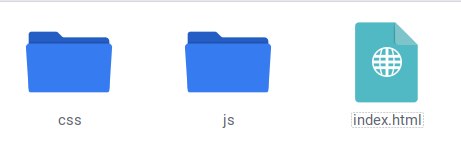
Nếu bạn không thể tự làm được thì có thể tải về bộ Source Code được làm sẵn tại link dưới đây:
Vậy là xong, cuối cùng bạn chỉ cần Upload bộ Source Code này lên Host và chia sẽ với bạn bè. Nếu bạn chưa biết cách Upload lên Host thì hãy tham khảo bài viết hướng dẫn của AnonyViet tại link dưới đây:
Bạn có thể sử dụng dịch vụ host miễn phí tại 000webhost để thử nghiệm source code nhé !!
Like Fanpage hoặc theo dõi website để cập nhật nhanh các bài viết hay.



Chúc bạn thành công
Lmint.
Câu hỏi thường gặp
Hiệu ứng ma trận 3D này được tạo ra bằng công nghệ gì?
Hiệu ứng ma trận 3D này được tạo ra bằng HTML, CSS và JavaScript. Nó sử dụng thẻ canvas để vẽ hiệu ứng.
Tôi có thể tùy chỉnh hiệu ứng này như thế nào?
Bạn có thể tùy chỉnh nhiều thuộc tính trong file `index.js`, chẳng hạn như tốc độ rơi của các ký tự, màu sắc, phông chữ và độ dài của dòng mã.
Nếu tôi gặp sự cố, tôi có thể tìm hỗ trợ ở đâu?
Bài viết gốc có cung cấp liên kết đến demo và mã nguồn. Bạn cũng có thể tìm kiếm thêm thông tin trên các diễn đàn lập trình hoặc cộng đồng trực tuyến về lập trình web.










Ad ơi! Sao em upload source code lên host như hướng dẫn mà sao khi vào trang web lại đen thui không có gì cả??? Anh xem giúp với ạ! Web em: https://peterparkerson.000webhostapp.com/
code bạn vẫn chạy mà
làm sao thêm nhạc vào nhỉ ad
cảm ơn ad, bài viết rất hay!!!!!!!!!!!!!!!!!!!
cảm ơn ad, bài viết rất hay!!!!!!!!!!!!!!!!!!!