


Hôm nay AnonyViet sẽ hướng dẫn các bạn sử dụng HTTrack download toàn bộ website để xem khi cúp mạng nhé !!!
Download HTTrack
Đối với Windows 2000/XP/Vista/7/8 (32 bit)
Các bài viết liên quan
[su_button url=”https://download.httrack.com/cserv.php3?File=httrack.exe” target=”blank” style=”stroked” size=”7″ center=”yes” radius=”round” text_shadow=”px px px “]Download [/su_button]
Đối Với Windows Vista/7/8 (64 bit)
[su_button url=”https://download.httrack.com/cserv.php3?File=httrack_x64.exe” target=”blank” style=”stroked” size=”7″ center=”yes” radius=”round” text_shadow=”px px px “]Download [/su_button]
Đối Với Linux/OSX/BSD/Unix
[su_button url=”https://download.httrack.com/cserv.php3?File=httrack.tar.gz” target=”blank” style=”stroked” size=”7″ center=”yes” radius=”round” text_shadow=”px px px “]Download [/su_button]
Đối Với Android (>= 2.2) (Google Play)
[su_button url=”https://play.google.com/store/apps/details?id=com.httrack.android” target=”blank” style=”stroked” size=”7″ center=”yes” radius=”round” text_shadow=”px px px “]Download [/su_button]
Cách download website bằng HTTrack
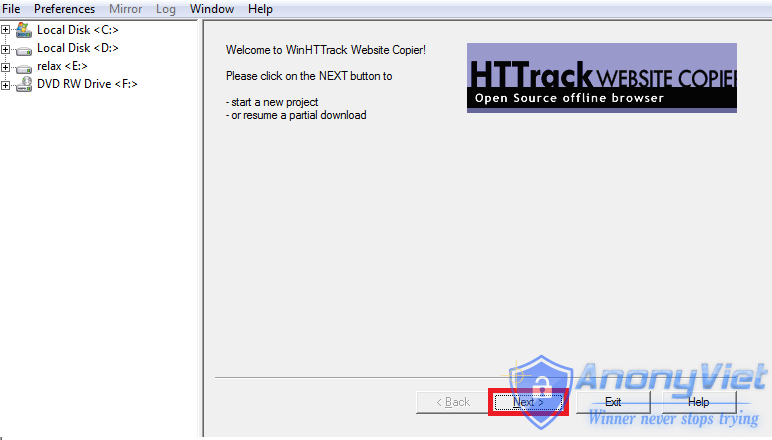
Bước 1: Đầu tiên các bạn mở WinHTTrack Website Copier và nhấn Next
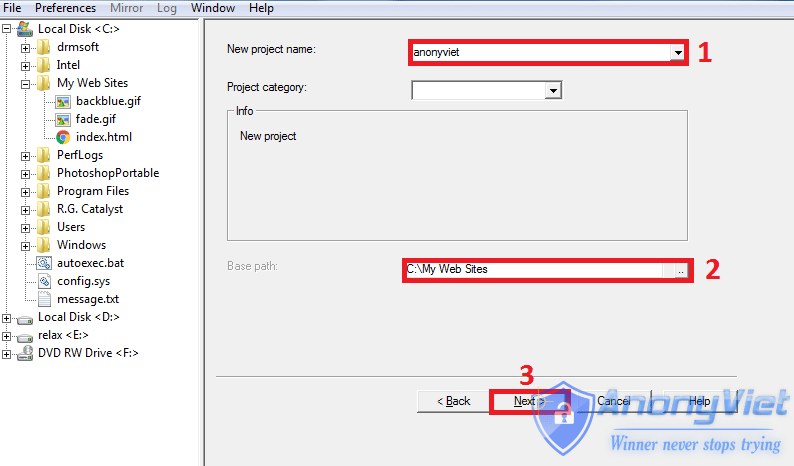
Bước 2: Điền thông tin vào
Trong đó :
- Tên website
- Thư mục chứa website
- Nhấn Next
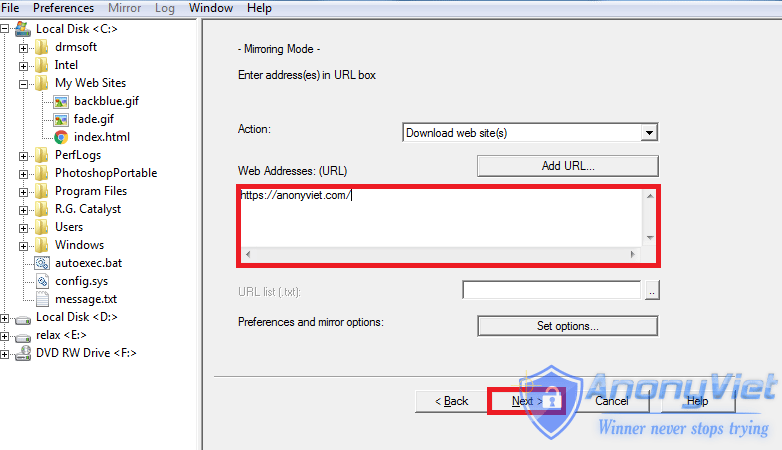
Bước 3: Bạn nhập link website muốn Download vào và nhấn next và tiếp tục nhấn Finish
Cuối cùng là ngồi đợi trong lúc download website về máy thôi 😀
Chúc các bạn thành công !!!






i love you xD
giao diện xem ntn v ad?